The switch gets VLANs, the board asks for a password, and a module is one click
VLANs on the board's own switch, tried before they are kept; a certificate endpoint; a board still on the factory password now insists you change it before it will do anything else; and Console, USB and Flash pick a module with one click instead of a drop-down.
Firmware v2.34.0 and v2.33.0, 20 September 2026 — the first images to carry bmcd 2.37.0, BMC-UI 3.32.0, tpi 1.9.0. Every item below is the repository's own changelog entry, taken apart; the whole entry is a click away under each one.
Pins bmcd 2.37.0, BMC-UI 3.30.0 and tpi 1.9.0 — the first release carrying the on-board switch, the certificate endpoint and the forced password change. Every component's own changelog has the detail; what follows is what this image adds on top of them. v2.33.0
New
A Certificates section in the README
v2.33.0
What the board issues itself, that it renews and now reissues on rename, that it never touches a certificate it did not issue, the three ways to install your own, and why the serial console is the one tab that breaks on an untrusted certificate.
VLANs can be given names
bmcd 2.37.0
An optional names map on the switch document, VLAN id to a word of up to 32 characters, carried and persisted with the rest of it.
The whole entry
It reaches the hardware nowhere: two documents differing only in their names plan no commands at all. It exists because a table of numbers is not a layout anybody can read a year later, and because the alternative — a name file beside the document — is a second thing to keep in step with the first, which would drift the first time somebody applied a preset.
Trunk names its own two VLANs management and nodes, because those are
the numbers the operator chose and has to match on the router. Flat and
Split name nothing: Split's identifiers never leave the board, so putting
them on a page would be showing somebody two numbers they can do nothing
with.
A name is checked for being a name — not blank, not longer than 32 characters, no control characters, and not attached to a reserved VLAN id — and for nothing else. Naming a VLAN nobody is in yet is allowed: people name a layout while they are building it.
Applying a switch configuration, and being able to undo it
bmcd 2.37.0
The rest of the switch work: GET and PUT /api/bmc/network/switch, and POST .../confirm and .../revert.
The whole entry
A change is applied on approval and kept on proof. PUT answers 202,
not 200: the configuration is on the switch but it is not yours to keep yet.
Confirm within the window, or the board puts the previous one back by
itself and records why, so the interface can say your change at 12:03 was
reverted because it was not confirmed.
The confirmation must arrive on a new connection, and that is the whole proof. After an apply the old path no longer exists, so any authenticated request that reaches the daemon came through the new configuration. Nothing else needs checking.
The window does not start when the apply returns. It starts when the uplink carrying the BMC's VLAN reports forwarding. Spanning tree holds a port in listening and learning for its own forwarding delay first — 30 seconds by default — so a window counted from the apply would expire before anybody could confirm a correct Trunk change, and would revert every one of them. The default window is 30 seconds and may be set per apply between 10 and 300.
Only a confirmed document is ever written. A reboot in the middle of an
unconfirmed change finds the previous one in /etc/bmcd/switch.json,
because the pending one was never persisted.
Safe mode skips applying, not reading. Holding KEY1 at power-on puts
safemode on the kernel command line, which preinit already reads; the
daemon reads it the same way and leaves the switch alone. That is the last
exit from a configuration that was reachable when it was confirmed and has
since stopped being, because a cable moved or the router changed.
The commands are planned as a list and then run, so the part most likely to be wrong — the order — is a pure function with tests. Filtering is enabled after the VLANs exist and disabled before they are removed, because a bridge filtering with no VLANs forwards nothing.
The switch as one document, and the rules the board refuses
bmcd 2.37.0
The model half of the most-asked feature on the public roadmap. Two read-only endpoints come with it: GET /api/bmc/network/switch/presets and POST /api/bmc/network/switch/validate.
The whole entry
The configuration is one object naming all seven ports — four modules,
the BMC's own port, and both uplinks — rather than a set of calls. Partial
application is how a board strands itself: six bridge vlan calls where the
fourth fails leave a switch in a state nobody designed. One document is
applied as one operation, and rollback is then "apply the previous
document".
Three presets. Flat is one bridge with filtering off, how a board ships and the reset target. Split is two groups that never meet, the BMC out of one uplink and the modules out of the other, with nothing tagged, so the other end needs no VLAN configuration at all. Trunk is one cable carrying both, tagged, with the second uplink redundant under spanning tree by default.
The board expands its own presets. A client that expanded Split itself
would eventually disagree with the board about what Split means, and that
disagreement shows up as a board nobody can reach.
Five refusals, each one a lockout rather than a preference:
- the BMC's own port in no untagged VLAN
- the BMC's own port alone in its VLAN
- a BMC VLAN that no uplink carries, so the board answers only to the modules it is meant to administer
- a tagged BMC port, which its network stack cannot read
- two uplinks sharing a VLAN with spanning tree off, which is a loop
Everything else is a warning with the port it is about, so an interface can say what is odd without refusing it.
Nothing here applies anything to hardware. The apply, the confirm window and persistence are separate and deliberately cannot be reached from this model.
Install your own certificate and key, from the interface or the API
bmcd 2.37.0
GET, PUT and DELETE on /api/bmc/tls/certificate.
The whole entry
For anyone running their own CA — the request came twice from people running step-ca — who wants a board that a browser trusting that CA opens without a warning, and a serial console that works, since a click-through exception does not cover the console's WebSocket.
Before this the only way to put such a certificate on a board was to copy two files over SSH.
Everything is checked before anything is written, because a board given a certificate it cannot serve may be a board nobody can reach to correct it. The key must belong to the certificate; the certificate must be valid now; it must permit server authentication, where it says anything about purpose at all; and it must name this board. A certificate naming some other host is refused with both name lists in the reason, rather than installed for a browser to reject later.
The key travels in a JSON body on its own path, never a query string. The
legacy dispatcher writes every opt=set call to the audit log in full, so a
key routed through it would be recorded in clear. What is logged is the
action, the actor, the subject and the expiry.
DELETE removes the pair and has the board issue its own, so it is never
left without one.
The confirm window is settable, beside the buttons it belongs to
BMC-UI 3.30.0
The daemon has accepted window_s per apply since the switch landed — 10 to 300 seconds — and publishes its own default and range; tpi has --window.
The whole entry
The card sent neither, so every apply, including Try it, silently got 30 seconds.
Thirty is enough to watch a preset take effect and too short to check a layout you made by hand, which is exactly when Try it is worth using.
The bounds come from the board's published limits, never from a number in
this page, and an untouched control sends no window_s at all so the board
keeps deciding. An out-of-range value greys the button out rather than being
sent to be refused, and the Apply confirmation quotes the number it will
actually use.
A page-length gate in CI
BMC-UI 3.30.0
scripts/screens.py measures every tab at 1280×800 and 390×844 on every pull request and fails on a header over 64 px, a tab over two screens, or a horizontal scrollbar at phone width.
The whole entry
Console is exempt: a terminal is meant to be tall.
Against the demo build, so no board is involved — the captured fixtures answer, and a card whose endpoint they lack hides itself exactly as it does on an older board. That also means the gate undercounts Access and Network by the access, certificate and switch cards, which is said in the script rather than left for somebody to discover; capturing those endpoints from a board closes it.
A baseline holds what is over the line today and is checked both directions, so a fault that gets fixed and left in the baseline fails too. It keys on the fault, never on the pixel count: a baseline holding numbers would fail on a one-pixel move, and a gate that cries every day gets switched off.
npm run screens runs it locally; npm run screens -- --record re-records.
An Access tab: what this board is called, and who may reach it
BMC-UI 3.30.0
The hostname, the password and trusted proxy, and the certificate this board serves, moved out of Settings into a tab of their own between Network and Firmware. Reading one of the three usually means reading the next.
The whole entry
"Security" was considered and rejected: a hostname is not a security setting, and a tab whose name is wrong for a quarter of what it holds is a tab people do not look in.
The switch on the Network tab: what it is doing, and how to change it
BMC-UI 3.30.0
The most-asked feature on the public roadmap, and the one with the sharpest failure — a wrong VLAN on the BMC's own port takes the board off the network, and the thing you would use to undo it is this page.
The whole entry
So the card never applies anything it keeps. An apply puts the change on the switch and starts a window; confirming is a second request, and the fact that it arrives at all is the proof that the new configuration works. If the page cannot reach the board there is nothing to press, the board puts the old configuration back by itself, and the next load says your change at 12:03 was put back because it was not confirmed in time.
The countdown does not start until the uplink forwards, and the card says which of the two it is waiting on. Spanning tree holds a port for its own delay before it passes traffic, so a countdown started at the apply would be counting down to a revert nobody could prevent.
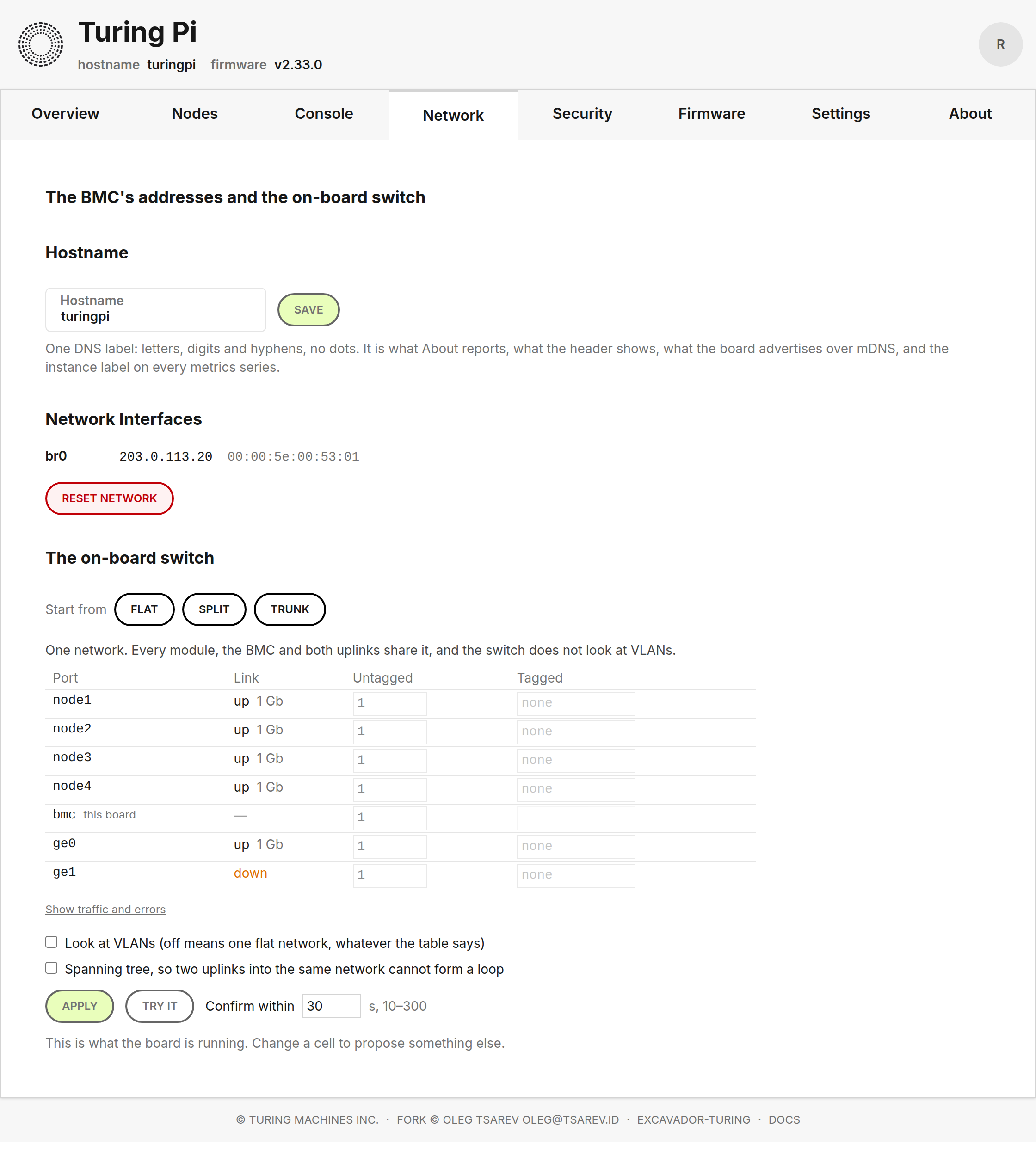
The table shows all seven ports as they sit on the board, coloured by the VLAN each is untagged in, with the BMC's own row marked. Colours are assigned by order of appearance rather than by VLAN number, because the numbers are the operator's and under Split they are internal ones nobody should be reading.
The card never expands a preset itself. The board returns each preset's full table and this shows it. A client that computed its own would eventually disagree with the board about what a preset means, and that disagreement is a board nobody can reach.
Six locales. Needs a daemon with /bmc/network/switch; on an older board
the card hides itself rather than appearing broken.
The page notices when the board goes away, and notices when it comes
back BMC-UI 3.30.0
Until now neither happened. Every polling query uses `refetchInterval: (query) => (query.state.error ?
The whole entry
false : N)`, which stops the interval permanently on the first error — so a BMC reboot silenced every query and nothing resumed when the board returned. A reboot the page itself started ended at a toast, and the tab held stale data until somebody reloaded it.
A banner above the header now says which of two things is happening, because only one of them has a number. A reboot this page asked for takes about 48 seconds — measured, from the upgrade guide's cost table — and says so, with a count. A board that stops answering on its own says that instead, with no countdown, because nobody promised one.
The count is a hint and says so when it passes: a board taking longer is still coming back, and presenting 48 seconds as a deadline would turn a slow reboot into an apparent failure.
When the daemon answers again the page reloads itself and reports how long it took, once. That is also how the number on the upgrade guide gets checked by everyone who updates.
Only a request that got no response counts as the board being gone. A query that fails with a status is a board that answered: endpoints are allowed to refuse, and treating that as a dead board would put an outage banner over a healthy one.
And coming back is judged by the shape of the answer, not its status.
bmcd serves this interface from the same listener and falls back to
index.html for a path it does not route, so a half-started daemon can
answer 200 with a page of HTML. Reloading on that lands on a page whose
first real query fails — the very fault this removes.
Six locales. The demo is excluded: its reboot answers with a refusal wrapped in a 200, which the mutation reads as success, so without the guard the exhibit would raise a banner and eventually reload itself.
A certificate card on Settings
BMC-UI 3.30.0
What the board serves over HTTPS, and a form to replace it with your own.
The whole entry
Asked for twice in the Turing Pi Discord by people running their own CA, who want a board a browser opens without a warning — and a serial console that works, since a click-through certificate exception does not extend to the console's WebSocket.
The card leads with where the certificate came from, because that looks like a label and is really a question of who renews it. The board reissues its own 30 days before expiry and needs nobody. It never touches an installed one — deliberately, since replacing an operator's certificate with a self-signed one at boot would turn a working deployment into a browser warning — so an installed certificate's expiry is a date somebody has to diarise, and the card says so in those words.
It shows the names the certificate asserts, because those are the reason a browser accepts or refuses it, and the fingerprint, because it is the only field that tells two certificates with the same subject apart.
Two mistakes are caught before the request: a certificate box that holds no
certificate, and one that holds a private key as well. The second is the
dangerous one — it is what openssl writes when told to put both in one
place, and sending it would put the key in a field the board treats as
public and echoes back.
A change takes effect on the next connection. Nothing restarts and no session is dropped, including the one making the change.
Needs bmcd with /bmc/tls/certificate. On an older board the card hides
itself rather than appearing broken, by checking the shape of the answer
rather than its status — an older daemon serves index.html for a path it
does not route, so the status is 200 and the body is a page of HTML.
Not in the demo: its fixtures are captured from a real board, never written, and there is no board running this daemon yet.
tpi network switch show --table
tpi 1.9.0
— the running document alone, as JSON, and nothing else. The other half of apply --table, so that editing a layout by hand is a round trip rather than a transcription:
The whole entry
tpi network switch show --table > mine.json
$EDITOR mine.json
tpi network switch apply --table mine.json
Starting from what the board is running, rather than from a blank file, means the ports you did not mean to change keep what they already had.
A board whose answer carries no document is an error here rather than an
empty file: an older daemon answers an unrouted path with 200 and
index.html, and writing that into the file somebody is about to apply
would be worse than saying so.
VLAN names are shown where VLAN numbers are
tpi 1.9.0
20 (nodes) rather than 20, wherever the document the board sent carries a name for it.
The whole entry
The number comes first and is never replaced — it is what bridge vlan show prints and what the router is configured with, so output that hid it could not be checked against anything.
tpi network switch
tpi 1.9.0
— show, presets, apply, confirm, revert. The command line for the on-board switch.
The whole entry
apply takes --preset flat|split|trunk or --table file.json, with
--mgmt-vid, --node-vid and --second-uplink for trunk, and --window
for the confirm window.
It prints what it has done in the terms that matter: the change is on the switch and not kept, the board will put the previous configuration back unless you confirm, and the countdown starts when the uplink forwards rather than now. The confirm command is printed ready to paste, because the moment you need it is the moment the page you were reading may have gone.
confirm is a separate invocation on purpose. That is the proof: if it can
reach the board, the new configuration works.
Trunk's two VLAN identifiers are refused here rather than at the board when they are missing or equal. They are the operator's — the router on the other end has to agree, and this tool cannot know what is free there.
presets never expands anything itself. A client that expanded a preset
would eventually disagree with the board about what it means, and that
disagreement is a board nobody can reach.
tpi tls show, tpi tls install --cert --key and tpi tls reset
tpi 1.9.0
The certificate the board serves over HTTPS, readable and replaceable from the command line.
The whole entry
For anyone running their own CA who wants a board a browser opens without a warning — and a serial console that works, since a click-through exception does not cover the console's WebSocket.
show prints the subject, issuer, validity, key type, the names the
certificate asserts and its fingerprint. It says in words whether the board
issued the certificate, and therefore renews it, or whether somebody
installed one and renewal is now their job.
install reads both files and checks their shape before contacting the
board: --cert and --key swapped, or one file holding both halves. The
board validates properly and refuses before writing anything; this is about
the message. A combined file is refused outright, because sending it would
put the private key in the field the board treats as public.
reset removes an installed certificate and has the board issue its own.
These are the only commands that do not go through the legacy dispatcher. That is the daemon's decision: it writes every mutating legacy query to the audit log in full, so a private key sent that way would be recorded in clear on the board.
A board whose daemon is too old is reported as an old daemon rather than with whatever it happened to answer. There is no version gate, because the board's own answer costs nothing and cannot be wrong about the board.
Two answers mean the same thing, and both are handled. A later daemon may
route these paths and reply 404; today's does not — bmcd serves the web
interface from the same listener and falls back to index.html for anything
it does not route, so an older board replies 200 with a page of HTML and
the only symptom is JSON that will not parse. Reading the status alone would
quote a page of markup at you instead of one sentence.
Changed
-
Which module: four pills, not a drop-down. Console, USB and Flash each opened with a list that unfolded to show four fixed entries, one already chosen. v2.34.0
The whole entry
The three tabs now share one picker, Node 1 to 4 side by side with the chosen one green — the same change the fleet shows, because it is one component serving both.
-
The certificate is no longer fixed at startup. It lives behind a lock and is chosen per connection through OpenSSL's servername callback, so installing one takes effect on the next connection with no restart — and the session that sent it survives to read the answer. bmcd 2.37.0
The whole entry
The callback is SNI's, and a BMC is normally reached by address, which sends no SNI. OpenSSL runs the callback for those handshakes too, and there is a test that connects with server-name indication switched off and asserts it is served the certificate installed a moment earlier. Without that, every board would keep serving its startup certificate while the API reported the new one.
-
bmcd_tls_certificate_infogains asourcelabel.self-signedorinstalled, read from the issuer rather than from any record of how the file was written. bmcd 2.37.0The whole entry
It decides whether the board renews the certificate on its own, so an expiry alert means something different for each.
-
Network, Security and Settings each fit a laptop window now. Measured on bmc-2 at 1280×800, where a tab has 744 px of usable height: Network was 1149 px, Access 1670, Settings 942. All three are 800 px — no scroll. BMC-UI 3.30.0
The whole entry
The cause was shared: every tab stacked full-width cards down a 1280 px screen, so pages made of three or four short cards scrolled while half the window stayed empty.
TabViewtakes acolumnsprop and lays them out in two columns atxl, where a column is still wide enough for a form. Belowxlnothing changes — two columns at 768 px would be two cramped ones. -
The hostname moved to Network, and Access became Security. A board's name is a network fact: it is how you reach it, it is in the certificate's subject-alternative names, and it is what the board advertises over mDNS. It sat on a different tab from the addresses it belongs with. BMC-UI 3.30.0
The whole entry
With it gone, the honest name for what is left — the password, the trusted proxy, the certificate — is Security. That name was considered and rejected one release ago for the good reason that a hostname is not a security setting; moving the hostname is what makes it right.
-
Addresses are one line per interface. Not three definition rows. The device, its address and its MAC are one fact about one thing. BMC-UI 3.30.0
- Installing a certificate is behind a disclosure. Two PEM boxes were 250 px of a card whose everyday job is answering what certificate does this board serve, and when does it expire. BMC-UI 3.30.0
- The switch's link column reads
1 Gb. Not1000 Mb/s · full duplex— which was most of the table's width and pushed it into a horizontal scrollbar inside a column. Half duplex still shows, in amber, because a gigabit port that negotiated half is a bad cable. BMC-UI 3.30.0 -
The fleet's chrome on a phone: 301 px to 121 px. Measured on the demo build at 390×844, a board inside the fleet spent more than a third of the viewport on three stacked rows — a header with a three-line subtitle, the board switcher wrapped to two lines, and ten tabs wrapped to four — before the first thing anybody came to look at. BMC-UI 3.30.0
The whole entry
Both rows now scroll rather than wrap. That is not only about height: a row that wraps moves every tab sideways when a board is added, which is how somebody ends up on Settings having aimed at Network. The subtitle is orientation rather than instruction, and is kept where there is room for it.
Desktop is unchanged at 137 px, which it already was: the fleet has its own header and never rendered the board's, so it did not pay the 182 px the board tab bar used to cost. That is worth saying because the ticket assumed otherwise — the fleet's problem was the phone, and only the phone.
-
The Firmware tab shows the newest release per source, not three. Four sources at three rows each was twelve rows of catalogue; the question the page exists to answer is is there something newer than what I am running, and where from. BMC-UI 3.30.0
The whole entry
Each source now shows its newest, with show all N opening the rest of that source in place. Nothing on offer changed, only how much of it is open at once — and a source that returned an error still shows the error where its row would be, because an empty list and an unreadable one are different answers.
-
Settings is a page again: 3014 px to 942 px. At 1280×800, four screens to just over one. BMC-UI 3.30.0
The whole entry
Three cards went to Access, and Firmware sources stopped being rendered on two tabs — the same editor was on Settings and on Firmware, and it only ever belonged where the sources are used. What is left is time, the fan, backup and restore, and the two buttons that touch the whole board.
-
One header bar, with the tabs inside it: 126 px back on every page. Measured on bmc-2 at 1280×800, the logo block was 128 px and the tab strip beneath it another 54 px, so every tab began 182 px down and a laptop showed 618 px of content out of 800. BMC-UI 3.30.0
The whole entry
It is now 56 px, and the tabs are in it.
The board's name and firmware version stay — they are how you know which window you are typing into — on one line beside the logo rather than under it. The active tab is underlined rather than drawn as a tab, because inside a header bar there is no strip for it to be part of.
Between
mdandxlthe strip stays: seven tabs plus the board's name do not fit beside each other at 768 px, and tabs that wrap are worse than tabs on a row of their own. Belowmdnothing changes at all — logo, name, hamburger, tabs in the drawer. -
The switch table is editable, and it is the only table on the Network tab. Presets fill it; they are no longer the only thing you can ask for. BMC-UI 3.30.0
The whole entry
Pick Flat, Split or Trunk and the cells populate from the board's own expansion. Then change any of them: each port's untagged VLAN is one box, its tagged VLANs a comma-separated list, and spanning tree and VLAN filtering are switches under the table. There is no Custom mode to enter, because there is no mode — the table is the configuration and a preset is a starting point.
The board judges every edit, and this page judges none of them. The whole table goes to
POST .../network/switch/validateas you type; a refusal disables Apply and is shown in the board's own words, and each warning sits beside the port it is about. The one judgement the client makes is whether what you typed is a number, because that is about text rather than about switches. A copy of the board's rules in here would eventually disagree with the board, and the way that disagreement surfaces is a board nobody can reach.Try it applies a change with no intention of keeping it. Watch what you reach the board by, see whether it still works, and let the window run out. For a hand-made layout it is the only honest dry run: the alternative is finding out by being locked out.
VLANs can be named — a word beside each number, carried in the document the board persists. A table of bare numbers is not a layout anybody can read a year later.
One table, not two. Link state and VLAN membership were separate panels about the same seven ports, so answering is node 3's cable in, and which network is it on meant matching names between them. They are now one row per port: link, negotiated rate, untagged, tagged — with traffic and error counters one click away. The unprobed-port alarm moved with them, and the table still renders on a board whose daemon has no switch configuration at all, because link state is the older feature and the one people arrive looking for.
The BMC's own row cannot be given a tagged VLAN. The board refuses such a document; a box you cannot type in says so before it has to.
Under Confirm, one line about where a confirmation has to come from: the browser you reach this board with, never a shell on the board itself. The daemon refuses the latter outright.
-
The console says why it failed, instead of listing three possibilities. A browser exposes nothing about a failed WebSocket handshake — no status, no reason, close code 1006 and silence — so the hint named the certificate as the likely cause and left the other two for the reader to weigh. BMC-UI 3.30.0
The whole entry
It does not have to guess. After a socket that never opened, one request to the same origin, for the console's own ring buffer, separates all three: an answer proves this origin, this session and this daemon's console support are all fine, which leaves only a certificate the browser will not open a socket to. A 401 is a refused session. Anything else is an unreachable board.
One sentence is shown, with the fix that matches it. The probe runs only after a failure, so a console that works costs nothing extra.
A 200 is not enough to say the daemon is fine. bmcd serves the interface from the same listener and falls back to
index.htmlfor a path it does not route, so a daemon without the console endpoints answers the probe with the interface's own page and a 200. The shape decides, not the status — otherwise a board with a perfectly good certificate would be reported as untrusted.Six locales. The demo never opens a socket, so it cannot reach the probe.
-
A refusal in
application/problem+jsonprints its sentence. Not the whole object. tpi 1.9.0The whole entry
Every path on the fork's own endpoints refuses in that shape and puts the message in
detail; this read only the legacy wrapper, so a perfectly clear refusal came out as escaped JSON and read like a parser error. -
A board still on its factory password says so in its own words. It refuses almost every call, and the bare refusal read as a permissions problem with whatever was asked for. tpi 1.9.0
The whole entry
It is not — it is a board that has not been set up — so it gets its own message, with the one thing that fixes it.
Recognised by the problem document's title, never by the status: 403 is also what a wrong password and a refused switch confirmation answer, and matching on the status would have told somebody confirming a switch change from the board's console to go and change their password.
-
applyandshownow say where a confirmation has to come from. One line under the confirm command: tpi 1.9.0The whole entry
Confirm from this machine, or from the board's interface. A confirmation sent from a shell on the board itself is refused: it crossed no switch port, so it would prove nothing.
The daemon refuses it outright; this is the version somebody reads before they try. Both say the same thing, in the same words, on purpose.
Fixed
-
A renamed board reissues its own certificate. The self-signed generator reissued on four conditions — no certificate, a mismatched pair, expiry within the renewal window, and never for a certificate it did not issue — and none of them was the board is not called that any more. v2.33.0
The whole entry
The names were computed and used only when issuing, never compared against what was on disk.
So renaming a board with
tpi hostname, or letting its address move, left the old names in the certificate for up to 825 days while every browser rejected it for a name mismatch, on a board that was otherwise perfectly healthy. It is the one trigger a "reissue now" button would have been for, and it is detectable, so it should never have needed a button.The comparison asks openssl one name at a time with
-checkhostand-checkip, and reads what it says rather than what it returns: this workstation's openssl exits 1 for a name that is not in the certificate, and the one on GitHub's runners exits 0 and says so only in its output. A check built on the status passed here and did nothing there — the same bug being fixed, inside the fix. There is a test that proves the primitive on whatever openssl is present before the rest of the suite trusts it.It reads the extension through openssl rather than comparing it as text. Text cannot be made to work: the SAN is written
DNS:board,IP:fd00:0:0:0:0:0:1533:6065and printed back asDNS:board, IP Address:FD00:0:0:0:0:0:1533:6065— a different separator, a different label, and an IPv6 address expanded and upper-cased. Normalising that by hand means writing an IPv6 canonicaliser in POSIX sh, and getting it subtly wrong means reissuing on every run: a new key at every boot and every pinned client broken daily, which is a far worse failure than the one being fixed. There is a test for that failure as well as for the fix.The predicate is every name the board has now is in the certificate, not the two lists are equal. An address the board has dropped leaves a stale name that asserts something untrue but breaks nothing and is gone at the next renewal; a name the board has gained is what breaks browsers, and it is caught.
-
The fleet says which version of itself it is.
Dockerfile.fleethas taken aBMC_UI_VERSIONbuild argument since the image existed, and the release workflow has been passing the tag into it all along — but it was set as a plainENV, and Vite only putsVITE_-prefixed variables into the bundle. BMC-UI 3.31.0The whole entry
So the value arrived at the build and stopped there.
The cost was not cosmetic: the deployed fleet sat two releases behind with nothing on the page able to say so. It is in the header now, beside the name.
-
The fleet has a footer, and a mark of its own. It is a separate entry point built from this same tree and never renders the board's root route, so it had no logo, no version and no footer — which also meant the upstream copyright notice, which is there for a legal reason, was missing from one of the two things this repository ships. BMC-UI 3.31.0
The whole entry
The footer is now a shared component used by both.
-
The docs link pointed at a dead host.
turing.excavador.xyzhas not answered for some time; the documentation is atturingpi.xyz. BMC-UI 3.31.0 -
A certificate naming the board by its real DNS name is no longer refused. The name check compared the certificate against the board's own idea of what it is called, which on a real board is not what its certificate says. bmcd 2.37.0
The whole entry
Found on bmc-2 while running the install gate. The board knows itself as
bmc-2. Its DHCP search domain ishaarlem.internal. The certificate its own authority issued namesbmc-2.haarlem.lan. Three different answers to "what is this board called", none of them wrong, and only one of them written anywhere the board can read. That certificate was accepted only because it happens to carry an IP address as well.A certificate naming just an FQDN — which is what
step ca certificate
bmc.lan
produces, and what the people who asked for this feature will have — would have been refused.So the check now also asks the question a browser actually asks. A browser does not compare a certificate against the board's idea of its own name; it compares it against the name the operator typed, having resolved that name to the board. A name that resolves to one of this board's addresses is a name someone can reach it by.
Bounded at two seconds per name, and failure is simply "no match", so a board whose DNS is down behaves exactly as it did before. Wildcards and address literals are never looked up.
Security
A board still on its factory password can do exactly one thing
bmcd 2.37.0
Every board leaves the factory as root / turing — printed in the quick-start guide, identical on every board ever sold, on a project whose own front page says a board should not face the internet.
The whole entry
Upstream has had an issue open about it since 2023.
Until it is changed, /api/bmc answers 403 to everything except
/authenticate, /access and /access/password, with a
application/problem+json body saying why. Not a banner: a banner is a
thing people close.
The test is the factory password, not the first login. root's hash is
asked whether it still verifies the word turing, of /etc/shadow itself,
cached against that file's modification time. Never a flag. A board whose
password was changed over SSH before anyone opened the interface is never
asked; a board reset to factory defaults is asked again, because it is a
factory board again. A change made by anything — this daemon, passwd, an
editor — is noticed on the next request, with no restart.
Loopback is exempt, because refusing it would protect nothing. Anyone
with a shell on the board is already root on it — they can read
/etc/shadow, run chpasswd, or stop the daemon. The threat this gate
exists for is a stranger who can reach port 443 on the management LAN, and
that stranger is not on loopback. What the exemption buys is the on-board
tpi working on a board that has not been set up; it is the only thing left
that relies on the bypass at all. tpi pointed at a factory board from
another machine is over the network, is gated, and says so.
(An earlier draft of this entry justified the exemption by the first-boot
promotion check. That was wrong: /metrics is a separate plain-HTTP
listener and S99postupdate does not pass through /api/bmc at all.
Corrected rather than deleted — a security exemption with a reason that does
not hold is worse than one with a thin reason.)
A wrong password on a factory board is still answered as a wrong password. Saying "this board is on its factory password" to a failed login would confirm the account name to somebody guessing.
The fleet is gated too: a gateway vouching for a person says nothing about whether the board has been set up.
GET /api/bmc/access gains factory_password, so the interface can
decide what to render before it asks for anything else. An interface that
learned its state from the 403s it collected would show a broken page first
and the explanation second.
A confirmation sent from the board itself is refused
bmcd 2.37.0
POST /api/bmc/network/switch/confirm answers 403 to a request that arrived over loopback, and says why:
The whole entry
A confirmation has to arrive over the network you just changed; that is what it proves. This one came from the board itself, which proves nothing. Confirm from the interface, or from
tpion another machine.
The whole design of apply-then-confirm rests on where the confirmation came from: after an apply the old path no longer exists, so a request that reaches the daemon came through the new configuration. A request over loopback crossed no switch port. It proves nothing, and it made the change permanent anyway — which is to say the one protection against locking yourself out had a hole in it that could be walked through by accident, from a console, by somebody being careful.
Found on hardware, not by reading. On 2026-09-20 a document reasoned to be equivalent to Flat was applied to bmc-2 and confirmed from the board's own ssh session; the board's owner lost the interface, and the window that exists for exactly that case never ran, because the confirmation had already arrived.
Apply and revert stay open to loopback. Applying is how a board is recovered from its console, and reverting is the safe direction — it puts back a configuration that was proved once already. Only the step that makes a change permanent has to have come from somewhere.
The password validator no longer logs a hash of what was typed
bmcd 2.37.0
It logged crypt(password, hash) at debug level on every attempt. For a correct password that is the stored hash, which is only as secret as /etc/shadow.
The whole entry
For a wrong one it is a hash of whatever was typed — and what people type into the wrong login box is usually a password that is correct somewhere else. A log file is far easier to read than /etc/shadow, and the board's logs are collected.
It was scaffolding for a four-line function that has tests.
A board still on the password it shipped with shows one page and nothing
else BMC-UI 3.30.0
Every board leaves the factory as root / turing, which is printed in the quick-start guide and identical on every board anyone has bought — so a board that has not had it changed is a board anybody who can reach it can administer.
The whole entry
The daemon refuses everything but logging in and changing it, so without this page the interface would render every tab as an error and leave the operator to work out why. Not a banner over the ordinary interface: a banner is a thing people close.
The page asks for the current password like any other change, which on this board is the published one. That is one more field to type and it keeps a single code path, rather than a "first time" route that skips a check.
It says, because it is one account: the new password is also the SSH password for the board.
The strings are English in every locale, for the reason the access strings
already are — this is the page that tells somebody their board is open to
anyone who can reach it, and a guessed translation of that is worse than a
sentence they can look up.
A board on an older daemon sends no factory_password at all, and nothing
changes for it: that daemon refuses nothing, so a page saying otherwise
would simply be false.
Every release of the firmware · the roadmap · follow by feed